ImageXtender1.0
Publisher Description
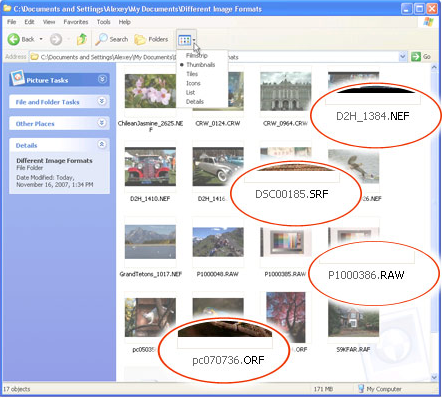
ImageXtender is a unique free application that teaches your Windows XP image viewer to understand more than 200 image formats. This is the first program to display such outdated formats as *.msp, *.gem together with really rare ones, such as *.cals, *.dpx.
Use ImageXtender to forget about problems with images produced by your digital photo camera or mobile phone, and with steep learning curves of other programs, too. Besides the fact that ImageXtender is free, you will save on not having to use several commercial applications designed for viewing special image formats.
ImageXtender is a program you won’t have to learn. It is easily installed into your system (Windows XP), and provides you with ability to use standard Windows image viewer for viewing files of nearly all image formats instead of 5 available before.
Once ImageXtender is installed, you can view images of most formats in 3 standard Windows modes - Preview, Thumbnails and Filmstrip. Besides, you’ll be able to view images in Windows Picture and Fax Viewer modes.
ImageXtender is a product of top quality and great functionality. It is really very easy to use. Still, should you have any questions on using the program, you can always consult ImageXtender support service to solve any problems in a fast, professional way.
About ImageXtender
This Converters & Optimizers program is available in English. It was last updated on 29 September, 2026. ImageXtender is compatible with the following operating systems: Windows.
The company that develops ImageXtender is fCoder, Ltd.. The latest version released by its developer is 1.0. This version was rated by 1 users of our site and has an average rating of 4.0.
The download we have available for ImageXtender has a file size of 4.2 MB. Just click the green Download button above to start the downloading process. The program is listed on our website since 2007-12-13 and was downloaded 242 times. We have already checked if the download link is safe, however for your own protection we recommend that you scan the downloaded software with your antivirus. Your antivirus may detect the ImageXtender as malware if the download link is broken.
How to install ImageXtender on your Windows device:
- Click on the Download button on our website. This will start the download from the website of the developer.
- Once the ImageXtender is downloaded click on it to start the setup process (assuming you are on a desktop computer).
- When the installation is finished you should be able to see and run the program.
Program Details
System requirements
Download information
Pricing
Version History
version 1.0
posted on 2007-12-13
New file formats, 16 bits per channel supports, new favoured features
